Film
 OptiLoad
Paste a link. Get the file.
€10, paid onceLifetime licence, no subscription
BuyOptiLoad is a native Mac download manager for Apple Silicon. The engine splits every file into as many as 128 parallel segments, so downloads finish at the speed your connection is actually capable of.
- 128Segments per file
- 1700+Sites it can pull from
- <1%CPU when idle
- €10Once, not monthly
The usual download managerOne stream, fingers crossed
OptiLoadUp to 128 segments a file
The app
What OptiLoad actually does.
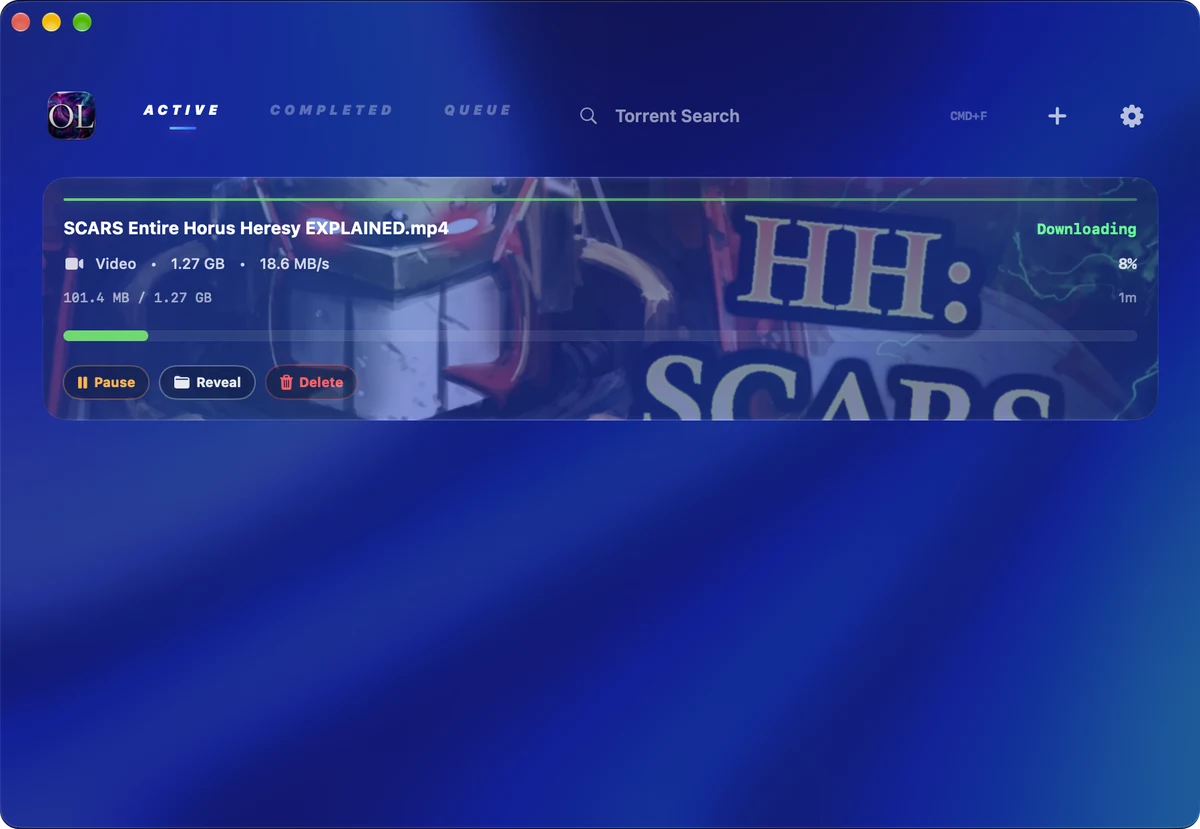
One window. Three tabs: active, completed, queued. A search box for torrents and a plus button for everything else. That’s the whole interface.
Lives in the menu bar
Click the icon, paste, done. Between jobs it sits under 1% CPU and you forget it’s running.
Written in SwiftUI
A real Mac app, not a website in a wrapper. It opens instantly, scrolls at 120 Hz, and leaves your battery alone.
Chrome and Firefox
Install the extension and anything your browser would have downloaded comes here instead, at full speed.
Media from 1700+ sites
Paste a link and OptiLoad recognises it before you’ve let go of the key. Pick audio or video, pick the quality, and the file lands in your folder. YouTube, Twitch, SoundCloud, Reddit, Vimeo, Bandcamp, and about seventeen hundred more.
Torrents, in the same app
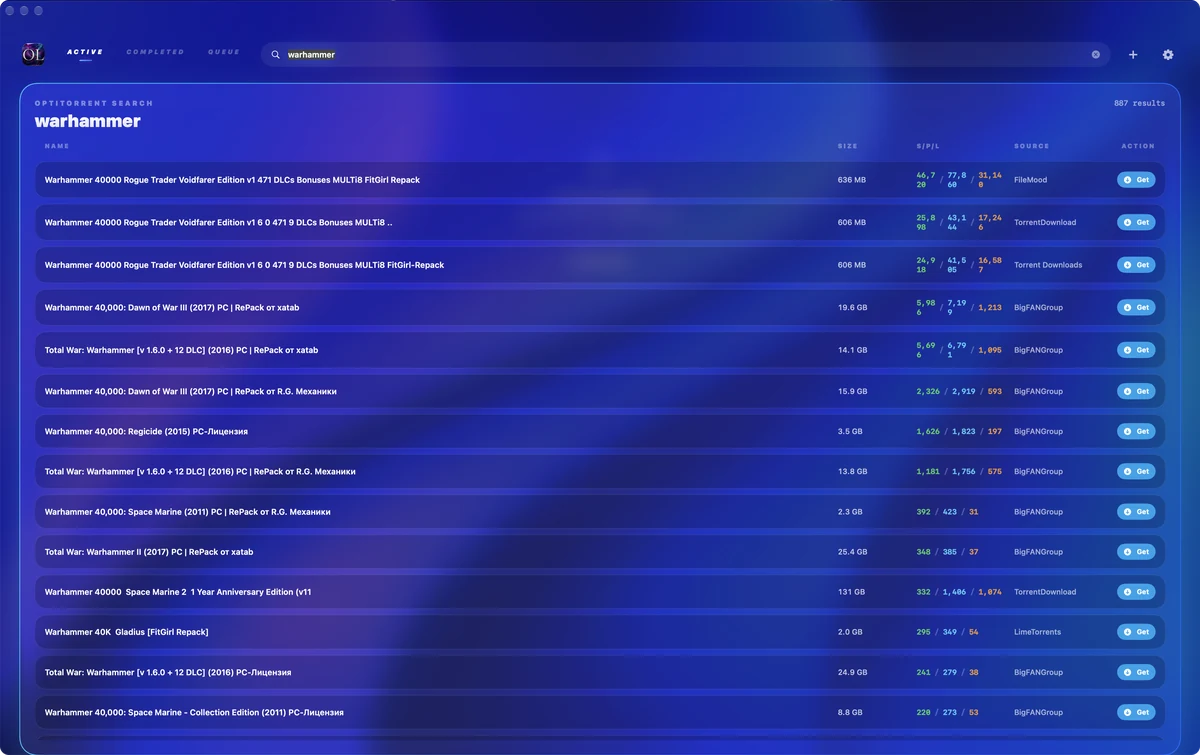
A full torrent client with Jackett and 60+ search plugins already wired up. Search from the app, pick a result, and it starts. No second app, no browser tab.
Right-click, send
Right-click a link, an image or a video anywhere on your Mac and send it straight to OptiLoad. Nothing to copy, nothing to paste.
It makes the call for you
Best source, best format, the right number of segments, all picked before you’d have finished reading the options. Every one of them is still yours to change.
Rules per site
Tell it once where a site’s files belong and what format you want them in. It won’t ask again.
Supported sites
If it plays, it downloads.
These are the ones people ask about. The list underneath them is considerably longer.
- YouTube
- Twitch
- TikTok
- X / Twitter
- SoundCloud
- Vimeo
- Mixcloud
- Tumblr
- Dailymotion
- Bandcamp
- Archive.org
- Bilibili
- Odysee
- Rumble
…and 1,700 more.
Handoff
Right-click and just send it.
Install the extension and your browser stops downloading things. It hands them to OptiLoad instead, which splits them, speeds them up and puts them where you wanted them. You carry on reading the page.
Side by side
Against the usual.
| Compared | OptiLoad | The usual download manager |
|---|---|---|
| Price | €10 once, no account with us | Monthly, forever |
| Engine | Up to 128 segments a file | One stream, fingers crossed |
| Media sites | 1700+, quality of your choosing | A handful, if the link cooperates |
| Torrents | Built in, with search | A separate app entirely |
| Browser | Chrome and Firefox hand over every download | A button that sometimes fires |
| Built with | SwiftUI, native on Apple Silicon | Electron, ported from Windows |
| When idle | A menu bar icon, under 1% CPU | A window you keep closing |
| Your data | Stays on your Mac | Read the privacy policy |
Alternatives
Looking for an alternative?
Download managers, media downloaders and torrent clients are usually three separate apps. OptiLoad is the one app, for €10 paid once.
Internet Download Manager (IDM) alternative for Mac
IDM does not exist on macOS, which is why people search for it here. Segmented multi-connection downloading, resume, queueing and browser interception are all present, up to 128 parallel segments per file, written natively for Apple Silicon. Internet Download Manager for Mac, side by side.
Folx alternative
The same job, with media extraction from more than 1,700 sites and a searching torrent client in the same window, as a one-time purchase with nothing held behind a higher tier.
JDownloader alternative
An alternative to JDownloader for anyone who would rather not run a Java application on a Mac. Native SwiftUI, opens instantly, and idles under 1% CPU in the menu bar.
Downie alternative
If it is the video downloading you want, paste a link and pick audio or video and the quality you want. The same engine also handles ordinary downloads and torrents, so it does not need a second app beside it.
4K Video Downloader alternative
Playlists, channels, quality selection up to the highest the source offers, audio-only extraction, and roughly seventeen hundred supported sites, with no per-day download limit attached.
Free Download Manager and Motrix alternative
The same segmented engine idea, built as a real Mac app rather than a cross-platform shell, with per-site rules for where files land and what format they arrive in.
yt-dlp GUI for Mac
If you have been using yt-dlp from the terminal, this is the graphical way to drive that kind of extraction: paste, choose format and quality, done, with the sensible defaults already picked.
qBittorrent and Transmission alternative
A full torrent client with Jackett and more than 60 search plugins already wired up, so searching, choosing and downloading happen in the app rather than across a browser and a second program.
Browser download manager alternative
Install the Chrome or Firefox extension and everything the browser would have downloaded is handed over instead, segmented and accelerated, filed where you wanted it.
Questions
Straight answers.
What is OptiLoad?
A native Apple Silicon download manager. It splits every file into as many as 128 parallel segments, extracts audio and video from more than 1,700 sites, and includes a full torrent client with search, in one window with three tabs: active, completed, queued.
How much faster are downloads, really?
The engine opens up to 128 parallel connections per file, so a transfer finishes at the speed your connection is actually capable of rather than whatever a single stream negotiates with the server.
Can it resume a broken download?
Yes. Interrupted transfers resume rather than starting again from zero, which is the whole point on large files and unreliable connections.
Can I download videos from websites?
Paste a link and OptiLoad recognises it before you have let go of the key. Pick audio or video, pick the quality, and the file lands in your folder.
Which sites are supported?
More than 1,700, including YouTube, YouTube Music, Twitch streams, VODs and clips, SoundCloud, Reddit, Vimeo and Bandcamp. Those are simply the ones people ask about most.
Can I download audio only, as an MP3?
Yes. Choose audio instead of video when the link is recognised, then pick the format and quality you want.
Can I choose the video quality?
Yes. OptiLoad picks the best source and format for you, and every one of those choices, including the number of segments, is still yours to change.
Does it handle torrents?
It includes a complete torrent client with Jackett and more than 60 search plugins already wired up. Search from inside the app, pick a result, and it starts. Magnet links and .torrent files both work.
Do I need a separate torrent app?
No, and that is the point. No second app, no browser tab, no tracker site open in the background.
Does it integrate with Chrome and Firefox?
Install the extension and anything your browser would have downloaded is handed to OptiLoad instead, segmented, accelerated and filed where you wanted it. The Firefox add-on is on addons.mozilla.org and the Chrome extension is supplied as a packaged .zip.
Can I send a link to it without copying and pasting?
Right-click a link, an image or a video anywhere on your Mac and send it straight to OptiLoad.
Can I set rules per site?
Yes. Tell OptiLoad once where a site’s files belong and what format you want from it, and it will not ask again.
Is this the IDM equivalent for Mac?
It covers what Mac users go looking for when they search for Internet Download Manager: segmented multi-connection downloading, resume, queueing, browser interception and media extraction, as a native Mac app rather than a Windows port.
How is it different from Folx, JDownloader or Downie?
One app instead of three. Segmented downloading, media extraction from 1700+ sites and a searching torrent client together, written in SwiftUI for Apple Silicon rather than Java or Electron, for €10 once rather than a subscription.
What does it use when it is idle?
Under 1% CPU. It sits in the menu bar between jobs and you forget it is running.
Is it an Electron app?
No. It is a real Mac app written in SwiftUI. It opens instantly, scrolls at 120 Hz, and leaves your battery alone.
Which Macs are supported?
Apple Silicon, M1 through M5. Version 6.1.2 is the current release.
How much is it, and is it a subscription?
€10 once. Lifetime licence, no subscription, no account to make with us, nothing to upgrade to later.
Does it send my data anywhere?
Your data stays on your Mac. There is no account and no telemetry.
Can I queue downloads and leave them running?
Yes. The window keeps active, completed and queued jobs on separate tabs, so a long queue can run in the background while OptiLoad stays in the menu bar.
Get OptiLoad.
€10one-time
Pay once and it’s yours. Lifetime licence, no subscription, no account to make with us, nothing to upgrade to later. PayPal handles the payment and the download arrives straight away.
CheckoutPayPal, in euros
- Version 6.1.2
- Apple Silicon native
- Lifetime licence