Film
 OptiTube
Four apps. One window.
€4.99, paid onceLifetime licence, no subscription
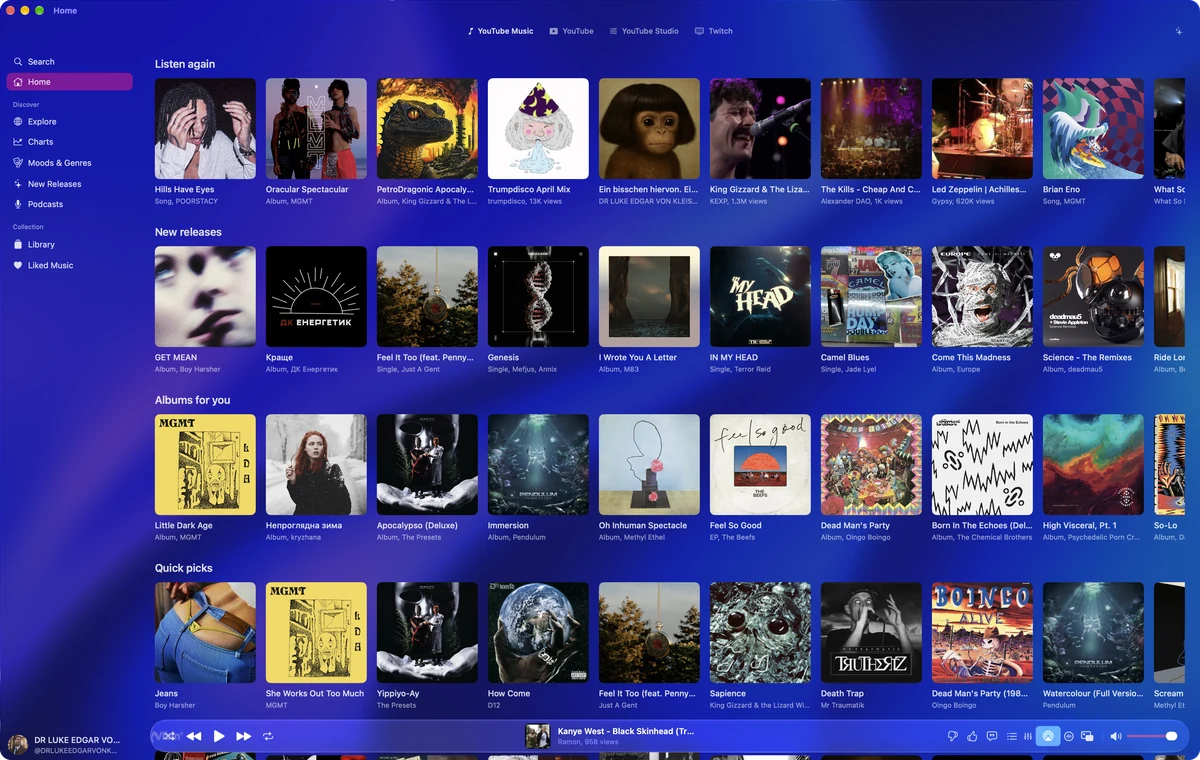
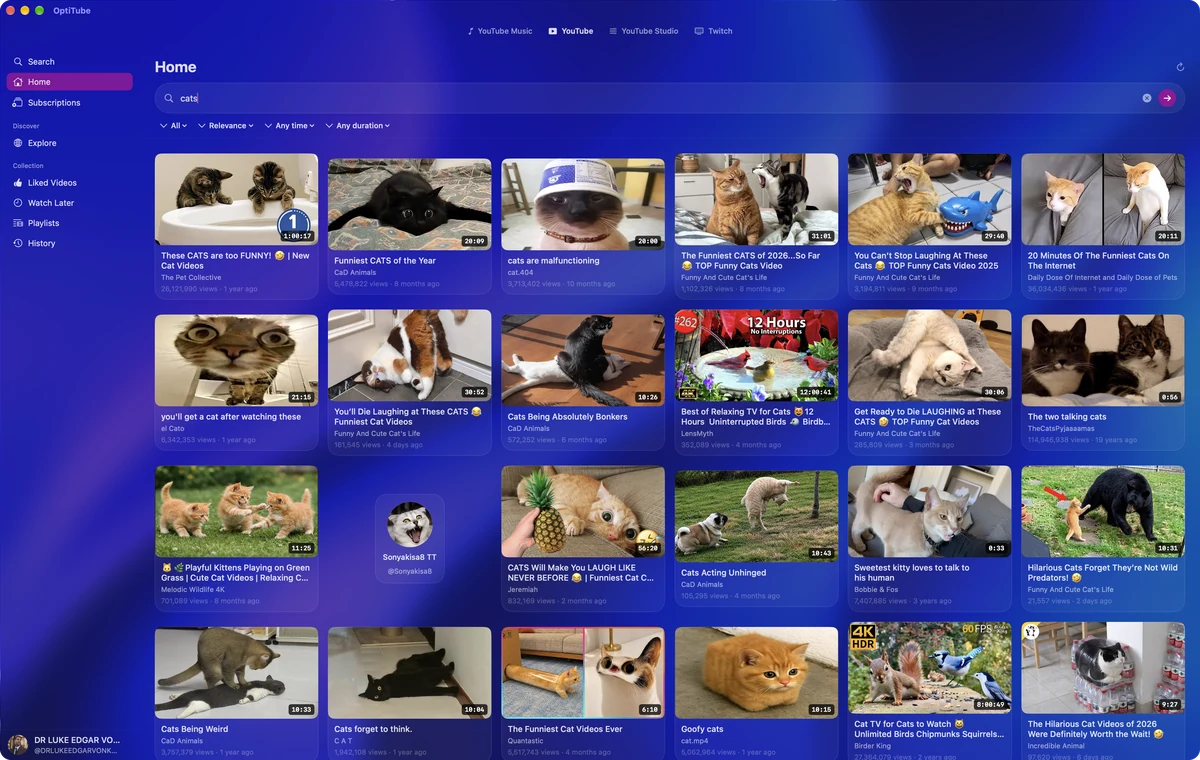
BuyOptiTube holds YouTube Music, YouTube, YouTube Studio and Twitch in a single native Mac app. One login, one window, four tabs across the top.
- 4Apps, one window
- 1080p60Twitch at source quality
- 120 HzProMotion native
- €4.99Once, not monthly
Four in one window
Everything in one place.
Four tabs sit across the top of the window. Click one and you’re somewhere else entirely. No second window, no signing in again, nothing reloading from scratch.
Twitch, done properly
The best Twitch on the Mac.
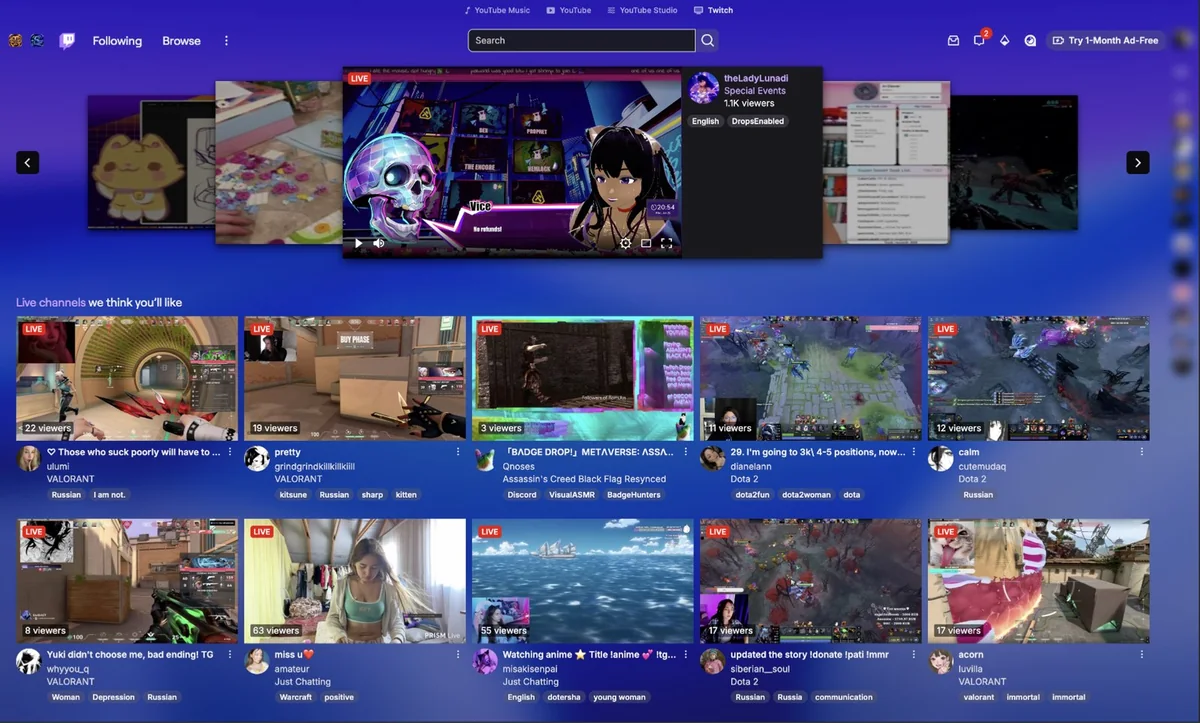
This is the part we’re proudest of. Twitch runs in full, and we’ve built things into it that Twitch itself doesn’t have.
- No ad breaks: OptiBlock is built in and already on. Streams also open at source quality instead of quietly dropping you to 720p.
- OptiScribe, live subtitles: it listens to the stream as it plays and puts subtitles on screen in your language. Any streamer, any language, while they’re talking.
- OptiTranslate, chat you can read: every message translated as it arrives and shown under the original, so a Russian or Korean chat stops being wallpaper. The rest of the page translates too.
- BetterTTV, already there: the real BetterTTV, emote picker included. Nothing to install, nothing to keep updated.
- Sign in with Touch ID: Google, Apple and Amazon logins open inside the app rather than throwing you out to a browser, so passkeys work the way they’re meant to.
Everywhere else
The small things, done right.
Lyrics that keep up
Synced line by line. You can also ask what a line actually means, or what mood the song is in, without leaving the page.
A real equaliser
Presets if you want them, full manual control if you don’t. Set it once and it stays set.
It lives in macOS
Now Playing in Control Center, media keys, Dock menu, a mini controller in the menu bar, and Last.fm scrobbling. Close the window and the music carries on.
Four themes
Glass, OptiGlass, Nightshade and Darkness. Whichever you pick, all four apps follow it.
Apple Intelligence
Ask for something the way you’d say it out loud and it finds it, queues it, or trims a playlist down. Runs on your Mac, not a server.
Yours to automate
Keyboard shortcuts for everything,
optitube://links to open a track straight away, and AppleScript so Raycast, Alfred and Shortcuts can drive it.
Instead of tabs
What you get back.
| Compared | OptiTube | Four browser tabs |
|---|---|---|
| YouTube Music | Native app, real player bar | A tab you keep losing |
| YouTube | Native feeds, real player | Another tab |
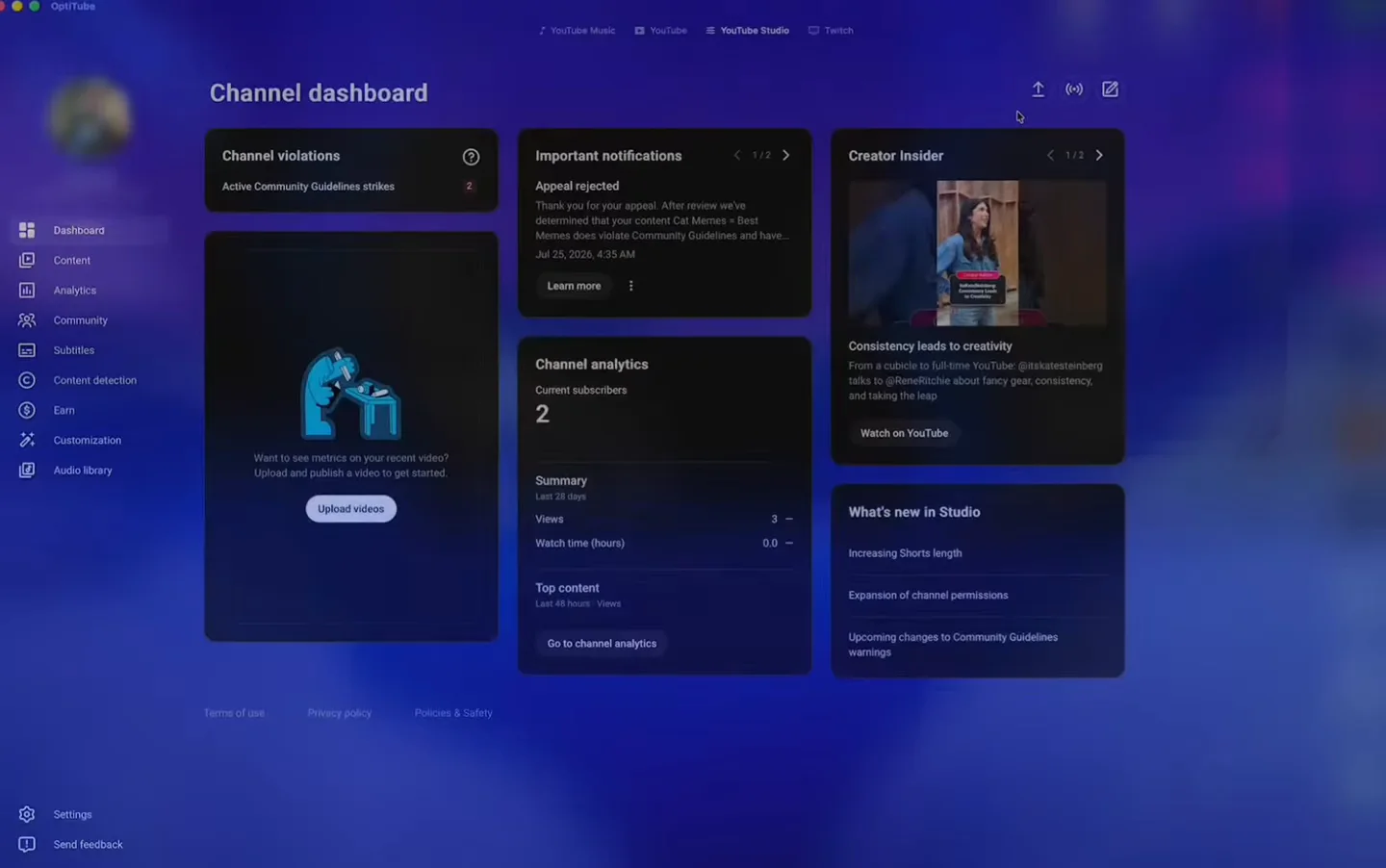
| YouTube Studio | Built in, already signed in | Another tab, sign in again |
| Twitch | Built in, ad breaks blocked | Another tab, ads and all |
| Subtitles on live streams | OptiScribe, any language | Nothing |
| Twitch chat in another language | Translated as it arrives | Copy, paste, translate, repeat |
| BetterTTV | Included and maintained | Find and install the extension |
| Playback controls | Media keys, Control Center, menu bar | Go hunting for the right tab |
| Look and feel | Four themes, applied everywhere | Whatever each site decides |
| Price | €4.99 once, no account with us | Free, with the ads |
Alternatives
Looking for an alternative?
There is no official YouTube Music or Twitch app for the Mac, so most people end up with tabs, wrappers and extensions. OptiTube replaces the lot, for €4.99 paid once.
YouTube Music desktop app alternative
The unofficial Electron clients exist because Google never shipped one. This is a native Mac app instead: library, playlists, charts, moods, podcasts and a real player bar, with Premium accounts playing as they should. YouTube Music as a Mac app.
Browser tabs alternative
Four tabs become four tabs inside one window: YouTube Music, YouTube, YouTube Studio and Twitch, one sign-in, nothing reloading from scratch and nothing to lose behind thirty other tabs.
Unite and Coherence X alternative
Site wrappers give you a window. This gives you playback integration with macOS, ad-break blocking on Twitch, live subtitles, chat translation and BetterTTV, none of which a wrapper can add.
Twitch desktop app for Mac
Twitch has no native Mac client. Following, browse, categories, live chat, subs and drops are all here, with streams opening at source quality instead of dropping to 720p.
Twitch ad blocker alternative
OptiBlock is built in and already on, so ad breaks do not interrupt the stream, and nothing needs installing or updating in a browser to keep it working.
BetterTTV and FrankerFaceZ extension alternative
The real BetterTTV is built in, emote picker included, so there is no browser extension to install and no extension to keep current.
Chatterino alternative
Chat sits beside the stream in the same window, and every message is translated as it arrives and shown under the original, so a chat in another language is readable rather than wallpaper.
Streamlink Twitch GUI alternative
Source-quality playback without a command line or a player configuration, plus live subtitles generated from the stream audio in your language while the streamer is talking.
Lyrics app and scrobbler alternative
Synced line-by-line lyrics, an equaliser with presets and manual control, Now Playing in Control Center, media keys, a menu bar controller and Last.fm scrobbling, all in the same app as the music.
Questions
Straight answers.
What is OptiTube?
One native Mac window holding four services as four tabs: YouTube Music, YouTube, YouTube Studio and Twitch. One login, nothing reloading from scratch, and no browser tabs to lose.
Is there an official YouTube Music app for Mac?
There is no official native Mac client, which is why people end up with a pinned browser tab. OptiTube gives YouTube Music a proper Mac interface with a real player bar, your library, playlists, charts, moods and podcasts.
Does it work with YouTube Premium?
Yes. You sign in with the Google account you already use, and Premium accounts play exactly as they should.
Do the media keys and Control Center work?
Yes: Now Playing in Control Center, hardware media keys, a Dock menu and a mini controller in the menu bar.
Does music keep playing when I close the window?
Yes. Close the window and the music carries on.
Does it scrobble to Last.fm?
Yes, Last.fm scrobbling is built in.
Does it show synced lyrics?
Line by line, in time with the track. You can also ask what a line actually means, or what mood the song is in, without leaving the page.
Is there an equalizer?
Yes. Presets if you want them, full manual control if you do not. Set it once and it stays set.
Is YouTube Studio included?
The full creator dashboard: uploads, analytics, comments, monetisation, customisation and the audio library, already signed in because it is the same account.
How complete is the Twitch side?
All of it: following, browse, categories, live chat, subs and drops, plus several things Twitch itself does not give you on the Mac.
Does it block Twitch ad breaks?
OptiBlock is built in and already on, so ad breaks do not interrupt the stream.
Why does Twitch drop me to 720p, and does OptiTube fix it?
Twitch quietly reduces quality on many streams. In OptiTube streams open at source quality instead, up to 1080p60 where the streamer is sending it.
Can I get subtitles on a live stream?
OptiScribe listens to the stream as it plays and puts subtitles on screen in your language, for any streamer, in any language, while they are talking.
Can it translate Twitch chat?
OptiTranslate translates every message as it arrives and shows it under the original, so a Russian, Korean or Japanese chat stops being wallpaper. The rest of the page translates too.
Do I need to install BetterTTV?
No. The real BetterTTV is built in, emote picker included, with nothing to install and nothing to keep updated.
Can I sign in with Touch ID or a passkey?
Google, Apple and Amazon logins open inside the app rather than throwing you out to a browser, so passkeys and Touch ID work the way they are meant to.
Can I theme it?
Four themes: Glass, OptiGlass, Nightshade and Darkness. Whichever you pick, all four services follow it.
What does the Apple Intelligence integration do?
Ask for something the way you would say it out loud and it finds it, queues it, or trims a playlist down. It runs on your Mac rather than on a server.
Can I automate it?
Keyboard shortcuts for everything, optitube:// links that open a track straight away, and AppleScript support so Raycast, Alfred and Shortcuts can drive it.
What does it require?
An Apple Silicon Mac running macOS 26 or later.
How much is it, and is it a subscription?
€4.99 once. No subscription, no trial, nothing to upgrade to later.
Is this just a browser in a wrapper?
It is a native Mac app: four surfaces in one window with real feeds, real players, native playback integration, and features a browser tab does not give you, including ad-break blocking, live subtitles, chat translation and BetterTTV.
Get OptiTube.
€4.99one-time
Pay once and it’s yours. No subscription, no trial, nothing to upgrade to later. Sign in with the Google account you already use and everything is where you left it.
CheckoutPayPal, in euros
- Apple Silicon native
- macOS 26 or later
- Lifetime licence